Wallet Money Manager-Expenses2.9
Publisher Description


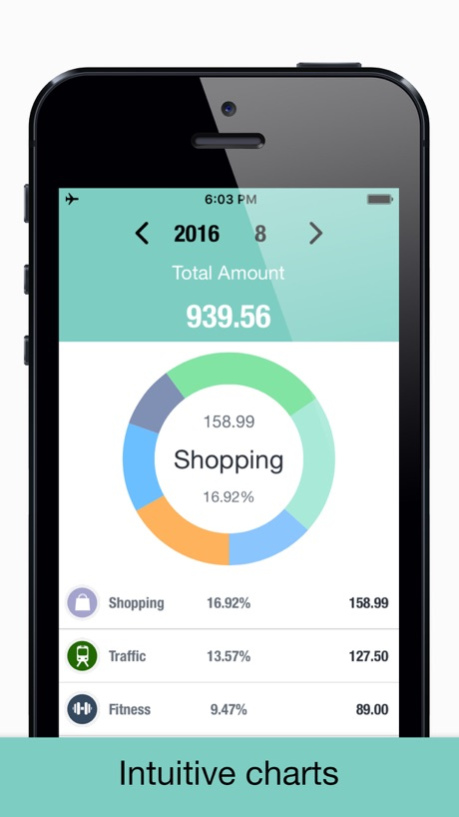
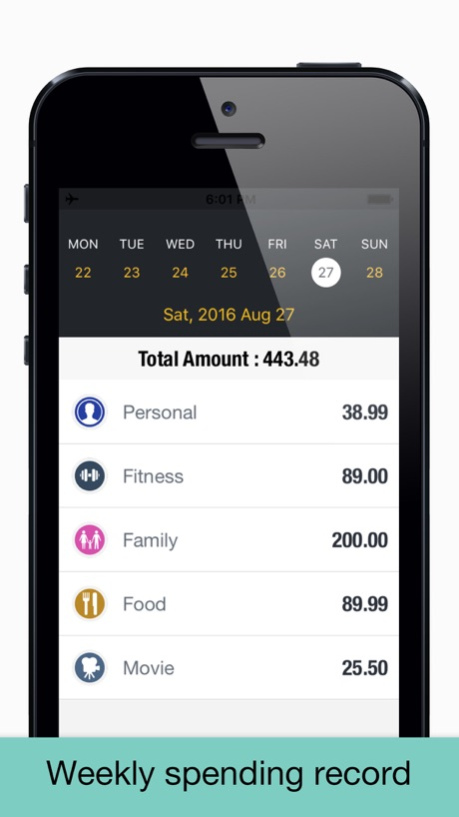
This is an all-in-one budgeting and financial management app designed specifically for iOS users, helping you easily track income and expenses, optimize spending habits, and achieve clear management of personal assets.
With a simple, intuitive interface and powerful backend features at its core, it supports daily transaction logging, multi-account management, recurring bills, spending statistics, and chart analysis. It's your portable financial manager.
Record income and expenses with one tap, supporting details like amount, category, account, and notes.
Comprehensive Transaction Management:
Quickly record income and expenses, supporting custom categories and accounts.
Recurring transaction feature automatically handles regular income and expenses (daily, weekly, monthly, yearly).
Photo attachment support, add receipt photos for transaction records.
Support for search and multi-dimensional filtering (time, type, amount, keywords) for more efficient record finding.
Recurring Transactions:
Supports setting up recurring bills (daily, weekly, monthly, yearly) that automatically generate records, so you never miss fixed expenses again.
Customizable frequency, interval, and end date for flexible management of repeating transactions.
Photo Attachments and Detail Management:
Each record supports adding up to 5 photos, making it easy to save receipts, screenshots, or proof of purchase.
Photo viewing, deletion, and full-screen viewing for better detail management.
Category Management:
Built-in rich category library (food, shopping, transportation, entertainment, etc.) with support for custom sorting and pinning.
Smart category statistics, giving you clear visibility into where your money goes.
Multi-Account Management:
Supports various account types including cash, Alipay, bank cards, and credit cards.
Real-time account balance updates, with clear tracking of asset changes.
Smart Statistical Analysis:
Monthly income and expense summaries with category filtering support.
Pie chart visualizations showing category percentages, filterable by month and type.
Monthly income and expense summaries for clear overview of total income, total expenses, and balance.
iCloud Sync & Backup:
Automatic data sync to iCloud for seamless multi-device experience.
Manual backup and restore options to ensure financial data security.
Data Export & Sharing:
CSV format data export for in-depth analysis.
Email sharing feature for quick report distribution.
Every expense is documented, eliminating the confusion of "where did the money go?"
Keep every penny under control - start managing your finances easily with budgeting.
Version History Bugfixs 2.9 11/04/2025 This version adds many new features and updates many existing features. Please export your existing data before upgrading. 2.8 10/21/2025 Bugfixs 2.7 05/10/2024 New date selection
Support Touch ID
Compatible with iPhone 6 Plus
Compatible with iPhone 7 Plus 2.6 01/17/2017 Adapted iOS 10
Bugfix 2.5 10/04/2016 Before updating this version, please export CSV data.
• New Design & Development •
- iCloud sync and backup.
- Gesture password protection.
- Support export CSV.
- Account Monthly Budget.
- Custom Account.
- Custom Categories.
- Weekly calendar.
- Colorful themes. 2.4 09/01/2016 Bugfix 2.3 06/01/2016 Optimization
Bugfix 2.2 05/12/2016 optimization 2.1 05/10/2016 [Keep it simple]
We redesigned the new version, simplify!
New features:
+ iCloud Sync
+ Gesture password protected transactions
+ Monthly budget, control spending limit per month
+ Daily & monthly income and expenditure summary
+ Each account under the income, expenditure, balance, Entry Summary
+ Transactions appear in the weekly calendar
+ Number of days remaining in the month
+ Per month remaining amount
+ Average daily spend
+ Trading charts
+ Transaction associated payee
+ Custom multiple categories
+ Customize multiple accounts 2.0 05/10/2016 CSV data bug fixes 1.3 07/22/2015 Redesign Features
Fixes Many Bugs 1.2 06/10/2015 Bugfix 1.1 03/31/2015 1.0 02/12/2015
About Wallet Money Manager-Expenses
The company that develops Wallet Money Manager-Expenses is 永文 胡. The latest version released by its developer is 2.9.
To install Wallet Money Manager-Expenses on your iOS device, just click the green Continue To App button above to start the installation process. The app is listed on our website since 2026-10-14 and was downloaded 4 times. We have already checked if the download link is safe, however for your own protection we recommend that you scan the downloaded app with your antivirus. Your antivirus may detect the Wallet Money Manager-Expenses as malware if the download link is broken.
How to install Wallet Money Manager-Expenses on your iOS device:
- Click on the Continue To App button on our website. This will redirect you to the App Store.
- Once the Wallet Money Manager-Expenses is shown in the iTunes listing of your iOS device, you can start its download and installation. Tap on the GET button to the right of the app to start downloading it.
- If you are not logged-in the iOS appstore app, you'll be prompted for your your Apple ID and/or password.
- After Wallet Money Manager-Expenses is downloaded, you'll see an INSTALL button to the right. Tap on it to start the actual installation of the iOS app.
- Once installation is finished you can tap on the OPEN button to start it. Its icon will also be added to your device home screen.
Program Details
System requirements
Download information
Pricing
Version History
version 2.9
posted on 2026-10-14
Version History Bugfixs 2.9 11/04/2025 This version adds many new features and updates many existing features. Please export your existing data before upgrading. 2.8 10/21/2025 Bugfixs 2.7 05/10/2024 New date selection
Support Touch ID
Compatible with iPhone 6 Plus
Compatible with iPhone 7 Plus 2.6 01/17/2017 Adapted iOS 10
Bugfix 2.5 10/04/2016 Before updating this version, please export CSV data.
• New Design & Development •
- iCloud sync and backup.
- Gesture password protection.
- Support export CSV.
- Account Monthly Budget.
- Custom Account.
- Custom Categories.
- Weekly calendar.
- Colorful themes. 2.4 09/01/2016 Bugfix 2.3 06/01/2016 Optimization
Bugfix 2.2 05/12/2016 optimization 2.1 05/10/2016 [Keep it simple]
We redesigned the new version, simplify!
New features:
+ iCloud Sync
+ Gesture password protected transactions
+ Monthly budget, control spending limit per month
+ Daily & monthly income and expenditure summary
+ Each account under the income, expenditure, balance, Entry Summary
+ Transactions appear in the weekly calendar
+ Number of days remaining in the month
+ Per month remaining amount
+ Average daily spend
+ Trading charts
+ Transaction associated payee
+ Custom multiple categories
+ Customize multiple accounts 2.0 05/10/2016 CSV data bug fixes 1.3 07/22/2015 Redesign Features
Fixes Many Bugs 1.2 06/10/2015 Bugfix 1.1 03/31/2015 1.0 02/12/2015
version 2.9
posted on 2026-09-03
Version History Bugfixs 2.9 11/04/2025 This version adds many new features and updates many existing features. Please export your existing data before upgrading. 2.8 10/21/2025 Bugfixs 2.7 05/10/2024 This app has been updated by Apple to prepare for watchOS 27 compatibility. No new features are included.
New date selection
Support Touch ID
Compatible with iPhone 6 Plus
Compatible with iPhone 7 Plus 2.6 01/17/2017 Adapted iOS 10
Bugfix 2.5 10/04/2016 Before updating this version, please export CSV data.
• New Design & Development •
- iCloud sync and backup.
- Gesture password protection.
- Support export CSV.
- Account Monthly Budget.
- Custom Account.
- Custom Categories.
- Weekly calendar.
- Colorful themes. 2.4 09/01/2016 Bugfix 2.3 06/01/2016 Optimization
Bugfix 2.2 05/12/2016 optimization 2.1 05/10/2016 [Keep it simple]
We redesigned the new version, simplify!
New features:
+ iCloud Sync
+ Gesture password protected transactions
+ Monthly budget, control spending limit per month
+ Daily & monthly income and expenditure summary
+ Each account under the income, expenditure, balance, Entry Summary
+ Transactions appear in the weekly calendar
+ Number of days remaining in the month
+ Per month remaining amount
+ Average daily spend
+ Trading charts
+ Transaction associated payee
+ Custom multiple categories
+ Customize multiple accounts 2.0 05/10/2016 CSV data bug fixes 1.3 07/22/2015 Redesign Features
Fixes Many Bugs 1.2 06/10/2015 Bugfix 1.1 03/31/2015 1.0 02/12/2015
version 2.9
posted on 2026-08-17
Version History Bugfixs 2.9 11/04/2025 This version adds many new features and updates many existing features. Please export your existing data before upgrading. 2.8 10/21/2025 Bugfixs 2.7 05/10/2024 This update from Apple will improve the functionality of this app. No new features are included.
New date selection
Support Touch ID
Compatible with iPhone 6 Plus
Compatible with iPhone 7 Plus 2.6 01/17/2017 Adapted iOS 10
Bugfix 2.5 10/04/2016 Before updating this version, please export CSV data.
• New Design & Development •
- iCloud sync and backup.
- Gesture password protection.
- Support export CSV.
- Account Monthly Budget.
- Custom Account.
- Custom Categories.
- Weekly calendar.
- Colorful themes. 2.4 09/01/2016 Bugfix 2.3 06/01/2016 Optimization
Bugfix 2.2 05/12/2016 optimization 2.1 05/10/2016 [Keep it simple]
We redesigned the new version, simplify!
New features:
+ iCloud Sync
+ Gesture password protected transactions
+ Monthly budget, control spending limit per month
+ Daily & monthly income and expenditure summary
+ Each account under the income, expenditure, balance, Entry Summary
+ Transactions appear in the weekly calendar
+ Number of days remaining in the month
+ Per month remaining amount
+ Average daily spend
+ Trading charts
+ Transaction associated payee
+ Custom multiple categories
+ Customize multiple accounts 2.0 05/10/2016 CSV data bug fixes 1.3 07/22/2015 Redesign Features
Fixes Many Bugs 1.2 06/10/2015 Bugfix 1.1 03/31/2015 1.0 02/12/2015
version 2.9
posted on 2025-11-04
Bugfixs
version 2.7
posted on 2024-05-10
May 10, 2024
Version 2.7
Bugfixs
version 2.6
posted on 2017-01-17
Jan 17, 2017
Version 2.6
This app has been updated by Apple to display the Apple Watch app icon.
New date selection
Support Touch ID
Compatible with iPhone 6 Plus
Compatible with iPhone 7 Plus
version 2.6
posted on 2017-01-17
Jan 17, 2017 Version 2.6
This app has been updated by Apple to use the latest Apple signing certificate.
New date selection
Support Touch ID
Compatible with iPhone 6 Plus
Compatible with iPhone 7 Plus
version 2.6
posted on 2017-01-17
Jan 17, 2017 Version 2.6
New date selection
Support Touch ID
Compatible with iPhone 6 Plus
Compatible with iPhone 7 Plus
version 2.6
posted on 2017-01-17
17 Jan 2017 Version 2.6
New date selection
Support Touch ID
Compatible with iPhone 6 Plus
Compatible with iPhone 7 Plus
version 2.6
posted on 1970-01-01
2017年1月17日 Version 2.6
New date selection
Support Touch ID
Compatible with iPhone 6 Plus
Compatible with iPhone 7 Plus
